Monday, April 27, 2020

Feedback: Reboot Amateur Radio WhatsApp Group – Reboot Coffee Drink Event 23 Februarie 2020 9am STARS Restaurant, Mossel Bay

The Reboot Amateur Radio WhatsApp Group as well as the Reboot Coffee Drink Event is open to all radio amateurs and prospective radio amateurs in South Africa. All our events are informal !! In other words no politics, no religion and no controversial or personal differences will be allowed or tolerated!!


Saturday 23 February 2020 at 9am was again an enjoyable and successful Coffee Drink session in Mossel Bay at STARS Restaurant. Once everybody bought the necessary refreshments the chin-wagging started!

Those present by way of mind: = 9

Johann ZS2BVD, Russel ZS2AHF, Francois ZS1Q, Abe ZS1ZS, Saney ZR1S, Danie ZS1DBJ, Johan ZS2I, Hentie ZS1LH and Thys ZS1TBP

Those present in the flesh: = 10

Beat ZS1HB, Chris ZS1M, Jimmy ZS1RB, Dave ZR1OAC, Nick ZS1N, Wessie ZS2A, Marie ZS1MEH, Andre ZS1AFB, Kevin ZS1ABU and Johan ZS1I.

All present were welcomed by the administrator of the Reboot Amateur Radio WhatsApp Group. This time there were a few formalities that needed to be finalized. The following were presented to those present:

  • Future Venues re: Mossel Bay/Great Brak River/George?
  • Reboot WhatsApp Group – Activities, projects, DX and HF Band Conditions.
  • The current administrator will be in Australia for April/Mei/June. Danie ZS1DBJ volunteered to assist with arrangements iro coffee drinks for the mentioned months. Thanks, Danie!!
  • Looking for a new administrator for the rest of the year. (July to November) Its important to rotate the administrator every so often, as new blood assure new ideas. Even if you can only assist for 1 or 2 months, it will be a new face and voice talking. I am sure many are sick and tired of my ugly face and voice. Andre ZS1AFB indicated that he is willing to take the reins from July to November. Thanks, Andre!!
  • Two new Group Admins will assist with the Reboot Amateur Radio WhatsApp Group. Jimmy ZS1RB and Keverne ZS1ABU indicated that they are willing to assist. They were duly appointed. Thanks, Jimmy and Keverne!!
  • Enquiry iro attendance by spouses of radio amateurs (husbands) who went silent key - They are most welcome at any of the Coffee Drink Sessions and so are any other YL’s of those radio amateurs attending the event.
  • Lucky Draws 2020.
  • Thanks and Appreciation.

It is impossible to provide all the finer and juicy details of this event. Moral of the story is to attend each and every coffee drink event, not to lose out. This event was surely the most interesting and educational held thus far and the main discussion point was Solar Power Systems.

Rondomtalie/Round Robin

  • Nick ZS1N – 40M Double Bazooka Antenna, SARL Field Day Contest, TH3 Antenna at Boggomsbaai, Solar Power Systems, Power Logger, Lithium Iron Battery, https://solaradvice.co.za/ Solar Power Setup by ZS4ZAC.
  • Dave ZR1OAC – Antenna Analyser Project, Measurement Techniques, Solar Power, Solar Panels, Optimum voltage for Inverter 300 volts.
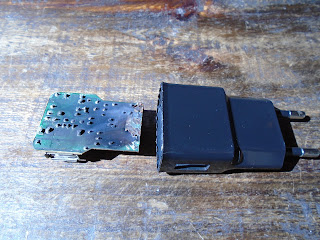
  • Beat ZS1HB – Solar Power System, Installing a system, System for you home, Different types of batteries and costs. Most expensive is the battery bank of pack. Cellphone charger exploded. Luckily no fire.
  • Andre ZS1AFB - Solar Power System for Ham Radio, Solar Power System for your Home, Victron 5kw Inverter, Solar Power Batteries and Blue Solar, Knysna.
  • Wessie ZS2A – Former Boeing Pilot and nowadays Farmer, Rigs in the shack – Yaesu FT950 and FT1000MP, 289 DXCC confirmed entities. Antenna - Mosley Tri-Bander 20/15/10 35 years old, tower climbing is ou but trolly/cage to lift and lower the antenna is in. Digital Modes. Solar Power DIY, do your calculations first. Lead Acid Batteries not recommended for Solar Home Installations. They do not last long!!
  • Jimmy ZS1RB - Echolink is down in the Southern Cape but not for long. Busy building a new echolink system which will include 1:1 transformers. He received 6 new transformers at the coffee drink. Will also be using a new radio for Echolink.
  • Marie ZS1MEH – Very poor reception and transmission of the 600 Danabay Repeater at her QTH in Hartenbos Heuwels. Linking of the Danabay and George Repeater? Can easily access the 700 and if the 600 and 700 repeaters are linked it will solve problems of the radio amateurs that live in that area. Solar Power System installation at home.
  • Chris ZS1M – Windows 7 discontinued – other options like Linux Mint. 32 or 64 bit? Upgrade from Windows 7 to 10. 24 volt Inverters, Solar Power System for the home. Amount of solar panels?
  • Keverne ZS1ABU - Now living 4 months in George. Currently using a “Claus” mast to support HF antenna but no VHF setup yet. Good reception and coms to ZS6 and ZS5. Solar Power Systems for your house and shack. Currently using two units successfully. One in the shack and one in the house.
  • Johan ZS1I - 1950’s Hand drawn circuit diagram on material of a VFO Exciter Unit. Solar Power Systems.

Lucky Draws

Congratulations or is it sympathy to the 4 winners of the Lucky Draw Competition.

Nick ZS1N – Digital Camera
Dave ZR1OAC – Digital Camera
Chris ZS1M – Wall Clocks
Jimmy ZS1RB – Electric Plug Pullers.

Please see all the photos of the above discussions and demonstrations. As said before you need to attend the coffee drink sessions to get the finer detail and juicy bits. If you do not attend you will miss out on detail.

Finally:

I concluded the event by thanking everyone for attending the event.
I trust that everyone enjoyed the event and that everybody had a great time.

We look forward to the next Reboot Coffee event which will be held in George on the 21 March 2020 at 9 am. The venue in George will be Root Coffee Roasters.

73

Johan ZS1I
Mossel Bay
1 March 2020

Photo Album: 


Beat ZS1HB - Cellphone charger that exploded while charging.


Keverne ZS1ABU - 2 x Inverters as being used and constructed by him


Johan ZS1I - 1950’s Hand drawn circuit diagram on material of a VFO Exciter Unit.


Beat ZS1HB - Cellphone charger that exploded while charging.


Keverne ZS1ABU - 2 x Inverters as being used and constructed by him

Sunday, April 26, 2020

Terugvoer: Koffie Drink – Reboot Amateur Radio WhatsApp Groep – 25 Januarie 2020 – Root Coffee Roasters op George.

Die PDF weergawe kan hier afgelaai word. Klik HIER 


Die Reboot Amateur Radio WhatsApp Groep asook die Reboot Koffie Drink is oop vir alle radio amateurs en voornemende radio amateurs in Suid Afrika. Al ons byeenkomste is informeel van aard en geensins klub verwant of gedrewe nie. Net ‘n klomp radio amateurs en voornemende radio amateurs wat hulself geniet. Ons drink een keer per maand saam koffie en bespreek allerlei amateur radio aspekte. Daar is geen formele prosedures nie maar daar is wel drie voorwaardes: (1) Geen amateur- of lands politiek nie. (2) Geen godsdiens. (3) Geen kontroversie of persoonlike geskille nie. Net vet pret, lekker lag en amateur radio is aan die orde van die dag.

Die afgelope Saterdag, 25 Januarie 2020 om 9vm was weer ‘n genotvolle en suksesvolle byeenkoms vir radio- en voornemende radio amateurs in George by Root Coffee Roasters. Die weer het mooi saamgespeel en was daar 12 radio amateurs teenwoordig gewees. Soos voorheen was die “venue” weereens tot ons gebruik beskikbaar gestel vir solank as wat ons dit wou benut. Ek will van die geleentheid gebruik maak om beide eienaars van Root Coffee te bedank vir hulle gasvryheid en die beskikbaarstelling van hulle fasiliteit aan Reboot Amateur Radio.
Diegene teenwoordig in die gees: = 5

Chris ZS1M, Hentie ZS1LH, Mari ZS1MEH, Abe ZS1ZS, Wessie ZS2A en Nick ZS1N. Baie dankie aan diegene wat die moeite gedoen het om verskoning aan te teken. Dit wys dat julle belangstelling toon in Reboot- en Amateur Radio Aktiwiteite in sy geheel. Die feit dat julle verskoning aanteken word hoog op prys gestel.

Die teenwoordig in die vlees: = 12

Johan ZS2BVD, Russel ZS2AHF, John ZS1ZR, Willie ZS2CC, Andre ZS1AFB, Johan ZS2I, Johan ZS1I , Dave ZR1AOC, Kevin ZS1ABU, Danie ZS1DBJ, Saney ZR1S en Francois ZS1Q.

Hier volg ‘n kort opsomming van Saterdag se gebeure:

Nadat almal die nodige koppie koffie of cappuccino aangekoop het het hulle plekke ingeneem en het ons sonder enige seremonie of formalitiete die Koffie Drinkery afgeskop. Na die nodige blad skud en verwelkoming is elkeen bedank vir die moeite wat hul gedoen het om saam te kom kuier.

Nou ja die Rondomtalie/Round Robin is so bietjie eenkant toe geskuif en het ons lekker informeer gesels en beduie oor projekte, amateur radio gebeurtenisse en sommer oor alles en nog wat, maar was daar soos altyd ook die komiese en skertsende insette wat vir groot pret en n ontspanne atmosfeer gesorg het.

Ek het ook besluit om net ‘n kort samevatting te gee van gebeure. Weereens nie om die Koffie Drink en aanbiedinge/besprekings af te water nie, maar eerder om te vehoed dat manne by die huis bly en wag op ‘n volledige samevatting van gebeure. Soos ek al voorheen gese het as jy nie die koffie drink geleenthede bywoon nie, gaan jy baie mis. So vanaf Januarie 2020 net ‘n kort samevatting en natuurlik fotos. Ek wil ook van die geleentheid gebruik maak om elkeen te bedank wat insette, bydraes en wysheid met ons gedeel het by die samekoms.

Hoof besprekings/demonstrasies en bydraes gelewer deur:

Johan ZS1BVD George

  • Buck Converter Power Supply x 4 met 3D gedrukte projek kassie
  • Arduino Solar Water Verwarmer Kontroleerder. Johan se eie ontwerp met bypassende sleutelbord.
  • Selfontwerpte sleutelborde vir Arduino en ander projekte. Min drade is die bonus hier.
  • Raspberry Pi 4 met 3D gedrukte projek kassie en waaier.

Andre ZS1AFB George

  • DIY Selfoon/PWS Power Pack ingebou in Ammo kassie.

John ZS1ZR George

  • Spark Plug herwin uit die See.
  • Philips Tweede Wereld Oorlog Flitslig.
  • Rubber Patroon.

Danie ZS1DBJ George

  • DIY PCB Klamp/Houer Projek
  • ATiny selfontwerpte PCB en komponente Projek

Francois ZS1Q George

  • ViCom Electronics sluit Maart 2020. Huidige eienaar soek ‘n koper vir voorraad. Sou iemand belangstel kan hulle kom kontak.


Kevin ZS1ABU George

  • Kevin will be ordering HF Ferrite Toroids from RS Electronics should anyone be interested they can contact Kenvin.

Willie ZS2CC George en Johan ZS2I Mosselbaai

  • HF Toestande
  • 6M Band Openinge
  • Band toestande

Saney ZR1S Wilderness

  • 40m Beacon Update – Solar Panel and Battery
  • Unicyc le Construction Project

Algemene Besprekings

  • Eskom Kragonderbrekings
  • Vliegtuig Ongeluk – Ruiterbos Mosselbaai
  • Sluiting van AREDN Mossel Bay Mesh Netwerk
  • Amateur Radio Nood Kommunikasie - einde van ‘n era en staking van toekomstige hulp en bydraes deur Johan ZS1I Mosselbaai.
  • Oorname van amateur radio aktiwiteite deur jonger en nuwe radio amateurs in die Suid Kaap.
  • Johan ZS1I Kennisgewing: Besoek aan Australia – April tot Junie 2020. Reelings tov Koffie Drink Byeenkomste vir bogenoemde tydperke.

Die tyd het weereens eenvoudig net verby gevlieg en was dit tyd om te groet. Maar voor ek finaal groet eers woorde van dank. ‘n Hartlike dank aan die volgende persone:

1. Elke liewe radio- en voornemende radio amateur wat saam kom koffie drink het. Reboot Koffie Drink Geleenthede is nie ‘n “one man show” nie en wat ek daarby bedoel is dat julle wat kom koffie drink en die geleentheid bywoon sorg vir die sukses van die geleentheid wat ook die komiese insluit. Die kameraderie en vriendskappe wat gebou word is nie te versmaai in vandag se samelewing nie. Sonder elkeen se deelname hoe gering ook al sou die Koffie Drink nie ‘n sukses gewees het nie, baie dankie aan elkeen!!

2. Hartlike dank aan die eienaars van Root Coffee Roasters vir gebruik van hulle fasiliteite vir meer as twee ure. Julle koffie is puik.

3. Dankie aan die volgende persone wat fotos geneem het van die Koffie Drink en Projekte:

  1. Francois ZS1Q
  2. Andre ZS2AFB


Al wat oorbly is die volgende datum vir die Reboot Koffie Drink en dit sal gehou word te Mosselbaai op die 22 Februarie 2020 om 9vm te STARS Restaurant. Teken nou al die datum aan in julle dagboeke dat daar nie botsende belange is nie en dat jy die geleentheid kan bywoon.

73

Johan ZS1I
Mosselbaai
sawois05 AT gmail DOT com

Photos Album:


Thursday, November 28, 2019

Feedback: Reboot Amateur Radio WhatsApp Group – Reboot Coffee Drink Event 23 November 2019 9am STARS Restaurant, Mossel Bay

PDF copy available HERE

The Reboot Amateur Radio WhatsApp Group as well as the Reboot Coffee Drink Event is open to all radio amateurs and prospective radio amateurs in  South Africa.  All our events are informal !!  In other words no politics, no religion and no contraversial or personal differences will be allowed or tolerated!!


Saturday 23 November 2019 at 9am was again an enjoyable and successful Coffee Drink session in Mossel Bay at STARS Restaurant. We could not have asked for better weather. Once everybody bought the necessary refreshments which included a breakfast the chin-wagging started!

Those present by way of mind: = 8

John ZS1ZR, Nick ZS1N, Johann ZS2BVD, Mari ZS1MEH, Russel ZS2AHF, Casey ZS1AAS, Wessie ZS2A and Francois ZS1Q

Those present in the flesh: = 12

Beat ZS1HB, Johan ZS2I, Danie ZS1DBJ, Willie ZS2CC, Chris ZS1M, Hentie ZS1LH, Abe ZS1ZS, Jimmy ZS1RB, Dave ZR1OAC, Saney ZR1S, Kevin ZS1ABU and Johan ZS1I.

All present were welcomed by the administrator of the Reboot Amateur Radio WhatsApp Group. This time there were a few formalities that needed to be mentioned. The following were presented to those present:

  • Short summary of the 2019 Coffee Drink Events – Success recipe created by all the radio amateurs that attended these events.
  • Reboot WhatsApp Group – Activities, projects, DX and HF Band Conditions.
  • Public Interest re: Coffee Drink Events.
  • Projects – Wide variety and the most ever in the Southern Cape.
  • 2020 Coffee Drink Event dates.
  • Lucky Draws 2020.
  • Thanks and Appreciation.


It is impossible to provide all the finer and juicy details of this event. Moral of the story is to attend each and every coffee drink event, not to lose out.

Rondomtalie/Round Robin

  • Chris ZS1M – Show-cased a Homebrew 2 Meter Receiver build by a non active amateur radio operator. Freq. 145 – 146 Mhz.
  • Hentie ZS1LH – Cherrie Pi vs Raspberry Pi? Radio Control Aircraft Interference.
  • Kevin ZS1ABU – Relocation from Cape Town to George. VHF Contests – Piketberg. Demonstrated his Homebrew 2m/70cm Dipole Antenna.
  • Abe ZS1ZS - Showed pins for BNC connectors turned by Danie ZS1DBJ on the metal lathe. Overview of his Homebrew Receiver for the Es’hail-2 / QB-100 Satellite. He also provided information to those who would like to build a similar project. ZS6J – Johannesburg Club website contain information on the feedhorn construction. Abe also displayed his CW Keyer using a Arduino Mega 2560.
  • Beat ZS1HB – Discussed the modifications he made to his Kenwood TS50S for RS232 conversion to use with his Pactor Modem/Controller. Mod. Micro-computer Interface and Remote Control Interface build.
  • Saney ZS1S – Update on the 40m Beacon, Victron Regulator, Battery Back-Up and 2 mW output power. A big thank you to Casey ZS1AAS for doing the maintenance on the beacon.
  • Danie ZS1DBJ – Displayed the homebrew pre-amp project he and Willie ZS2CC played around with on the Icom 7000 Radio. Danie indicated that the pre-amp is noisy and did not perform well.
  • Dave ZR1AOC - The Icom 7000 is well known for microphone hick-ups. He suggested to Danie ZS1DBJ reset the radio to factory defaults and then try the pre-amp again. Dave has an Icom 7000 in his shack and the reset solved bad microphone issues.
  • Johan ZS2I, Jimmy ZS1RB, Johan ZS1I and Willie ZS2CC opted for the silent mode and enjoyed their coffee and refreshments.

Please see all the fotos of the above discussions and demonstrations. As said before you need to attend the coffee drink sessions to get the finer detail and juicy bits. If you do not attend you will miss out on detail.

Finally:

I concluded the event by thanking everyone for attending the event. A special word of thanks must go to Kevin ZS1ABU who on his first Coffee Drink, undertook the task to sort out the STARS account. (Not an enjoyable task at all.) Kevin’s willingness is highly appreciated.

I trust that everyone enjoyed the event and that everybody had a great time.

We look forward to the next Reboot Coffee event in 2020 which will be held in George on the 25 January 2020 at 9 am. The venue in George will be announced closer to the date.

73

Johan ZS1I
Mossel Bay
28 November 2019

Photos: 


Ragchewing

Inside view 2 Meter RX displayed by Chris ZS1M

Ragchewing

Front view 2 Meter RX displayed by Chris ZS1M

Back view 2 Meter RX displayed by Chris ZS1M

Inside view 2 Meter RX displayed by Chris ZS1M

Homebrew 2m/70cm Dipole Antenna by Kevin ZS1ABU

Complete Homebrew 2m/70cm Dipole Antenna by Kevin ZS1ABU.

Homebrew Receiver for the Es’hail-2 / QB-100 Satellite by Abe ZS1ZS

Homebrew Receiver for the Es’hail-2 / QB-100 Satellite by Abe ZS1ZS

Homebrew CW Keyer used with an Arduino Mega 2560 by Abe ZS1ZS

Homebrew CW Keyer used with an Arduino Mega 2560 by Abe ZS1ZS

Modification to Kenwood TS50S for RS232 conversion to use with his Pactor Modem/Controller by Beat ZS1HB.

Modification to Kenwood TS50S for RS232 conversion to use with his Pactor Modem/Controller by Beat ZS1HB. 

Homebrew Micro-computer Interface and Remote Control Interface build by Beat ZS1HB


Homebrew microphone pre-amp project by Danie ZS1DBJ

Homebrew microphone pre-amp project by Danie ZS1DBJ
 

Thursday, October 24, 2019

Setup the Huawei B315s-936 LTE Router/Modem for Echolink and AllStar


NOTE:  A PDF file with photos for this tutorial is available at:  https://drive.google.com/file/d/1RMPzkXuDFGbTL_x0r58XW3pz6R_6Us48/view?usp=sharing 

Connecting cables

Connect the following to setup the router:

  1. Power Adapter to power socket on router
  2. Laptop or Computer ethernet LAN cable to LAN1 on router
  3. Before powering up the Power Adapter make sure you inserted you SIM card in the SIM slot.
  4. Once connected to a power outlet and switched on, the B315 will power on.
  5. Now wait till you have and indication that the computer’s LAN and LAN1 is connected. Your computer and B315 ethernet icons should talk to each other.
  6. We are now ready to log into the Huawei and configure the B315.

Open Huawei B315s-936 Router IP Address


The Huawei B315s-936 Router’s Internal default IP Address is: 192.168.8.1 type http://192.168.8.1 in your computer’s Internet Browser.

Login to the Huawei B315s-936 Router

Click on any of the task bar names and a screen should open asking your username and password. Enter default username: admin and password: admin to complete the login process. Voila! You are now logged in!

Default username for Huawei B315s-936:
admin

Default password for Huawei B315s-936:
admin


It is important to change the admin password to a secure password of your choice. This can be done by Settings, System, Modify Password. A screen will open. Previous password is: admin. Change to new password, confirm and apply. You will have to log in again this time as: user = admin password = “your new password that you just set”.

(Note: If  you have changed the username/ password of Huawei B315s-936 and forgot them. You can reset the Huawei B315s-936 router by press-and-hold the reset button with a clip for about 15 seconds. )
Now to setup the router. We started on the Home page of the Huawei B315s-936 router. To change your router settings click Settings near the top right hand side of the page. From there click WLAN in the left hand sidebar and then WLAN Basic Settings just below that.
Steps:
• Look for – Settings (found in the menu bar at the top of page) , and click on it
• Look for – WLAN (found in the left hand side menu bar) , and click on it
• Look for - WLAN Basic Settings (found in the left hand side menu bar), and click on it. 


The first thing you'll need to do is set an SSID. This will serve as your wifi network identification and can be whatever you like. However, due to security reasons I strongly recommend avoiding the use of any personal information.

Next open the drop down menu labelled Security mode and choose WPA2-PSK. This option will provide you with the strongest security. Lastly you'll need to set a WPA pre-shared key. This will be your network password and can be whatever you like. However bear in mind that a strong password is 14-20 characters in length and includes no personal information.
That's it! That's all there is to it. Just don't forget to save your changes before closing the page.

Possible Problems when Changing your WiFi Settings

After making these changes to your router you will almost definitely have to reconnect any previously connected devices. This is usually done at the device itself and not at your computer.
Setting up your Telkom Connection

Click on Settings, Dial-up and then Profile Management. Before making changes write down you current Profile Management settings just in case it is lost. Now click New Profile and enter the following info:
  1. Profile name = Telkom SA (default)
  2. User name = Leave blank
  3. Password = Leave blank
  4. IP type = IPv4
  5. APN = unrestricted
Click Apply and Reboot your router.

Disable Firewall - Open Echolink and AllStar Ports

Disable Firewall - Once rebooted log in again and we will now open the ports for Echolink and if you run AllStar, that port as well. Click Settings, Security and Firewall Switch. Disable all items listed. We do not need a firewall as your computer already use a firewall. Just make an exception for Echolink and AllStar on you computers firewall. Google is you friend here as there are many operating systems and I cannot list a how to here. Click apply and then wait for confirmation. Your B315’s firewall is now disabled. Wait for confirmation.

Open Ports – Click Settings, Security, Virtual Server. Your virtual server list should be empty unless you added ports already. Click Add. If you do not run an AllStar node you need not open that port. Fill in the slots as shown above. The LAN IP Address is the IP Address that the router allocated to the computer that is connected to the B315s. The IP address that you must enter here must be the IP address of the computer which has the Echolink program installed. If you use another computer then that computers IP Address must be listed here. To find out what the computers IP Address is open a terminal command prompt window. Once again Google is your friend as there are many operating systems.

Now type ipconfig at the prompt and a window should open giving you information. Look for Ethernet Adapter Local Area Connection. Look or IPv4 Address and you should see the IP address of the current computer connected to the B315s (192.168.8.xx xx = a number.) Write the IP address down and enter this address at the virtual servers address. If you have the wrong IP address here your Echolink ports will not be open. Status must be ON and click OK. Add all the other ports as listed in the virtual server image. Click Apply and wait for confirmation.

Open Ports – Click Settings, Security, Special Applications. Your special applications list should be empty unless you added ports already. Click Add. If you do not run an AllStar node you need not open that port. Fill in the slots as shown above. Click Apply and wait for confirmation. Reboot your Huawei B315s and Computer.

Once rebooted you will have to login to your B315s. Make sure that you connect to Telkom on the Home screen of the B315s and that is displays connected with the two arrows in the green state. You should now be able to connect and receive Echolink / AllStar connections. Finally make sure that your Firewall on your computer list Echolink as an exception and does not block Echolink. Thats it!! Mine is working flawlessly.


Compiled by Johan ZS1I, Mossel Bay for the Reboot Amateur Radio WhatsApp Group. Date: 24 October 2019. Email: sawois05@gmail.com